Introduction
Photo editing has become an important part of sharing pictures on social media, creating content, and improving everyday photos. Whether you want to remove unwanted objects, enhance portraits, change backgrounds, or apply creative filters, a good editing app can make the process easier. EPIK Editor Mod APK is a popular search among Android users looking for advanced AI photo editing tools and premium editing options.
EPIK – AI Photo & Video Editor is developed by SNOW Corporation. It combines artificial intelligence with professional editing tools, portrait retouching, creative effects, templates, and video editing features. Users can make detailed adjustments or apply ready-made effects without needing advanced editing experience.
Some third-party websites advertise EPIK Mod APK with premium features unlocked. However, these are unofficial modifications, and their features are not verified or guaranteed by the developer. In this guide, we will explore EPIK’s actual editing tools, premium options, old versions, download process, and important safety considerations.
EPIK Editor Mod APK Overview
EPIK is an all-in-one photo and video editing application designed for people who want to improve their pictures using simple controls and advanced tools. It offers features for beginners as well as users who prefer more detailed editing.
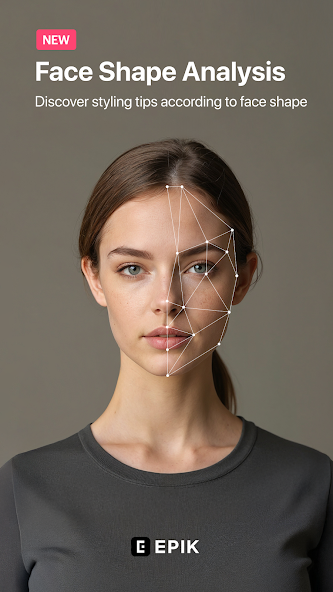
The app includes AI Enhance, AI Skin, smart cutout, object removal, color adjustment, portrait retouching, filters, templates, and creative effects. It also supports tools such as HSL, Curves, Split Tone, Patch, and Clone for more precise editing.
EPIK Mod APK refers to an unofficial modified version advertised by third-party websites. Depending on the file, its publisher may claim that certain premium tools or paid features are unlocked. These claims should be treated carefully because SNOW Corporation does not officially distribute or support modified APK files.
EPIK Editor Mod APK Information
The following table provides general information about the official application. Version numbers, file sizes, and Android requirements can change, so check the current Google Play listing before downloading.
| App Information | Details |
|---|---|
| App Name | EPIK – AI Photo & Video Editor |
| Developer | SNOW Corporation |
| Category | Photography |
| Platform | Android |
| App Type | Photo and Video Editor |
| Latest Version | v7.5.20 |
| Get it On | Play Store |
| Android Requirements | 10 and up |
| MOD Features | Premium unlocked claims are unverified |
Table of Contents
What Is EPIK AI Photo Editor?
EPIK AI Photo Editor is a mobile editing app that combines traditional photo adjustment tools with AI-powered features. It allows users to improve image quality, retouch portraits, remove unwanted elements, create collages, and add different visual effects.
One useful aspect of the app is that it offers several editing methods in one place. You can use automatic tools for quick improvements or adjust individual settings when you want more control over the final result.
EPIK also includes video-related features, such as video mosaic, Retro Clip, and Video Face Edit. This makes it more than a basic photo filter application.
For another photo editing option, try Lightroom Mod APK, which offers information about professional photo adjustments, creative presets, filters, and color-grading tools.
EPIK AI Photo Editor Mod APK Features
EPIK offers a wide collection of editing tools. The following sections explain the features listed for the official app. Any additional unlocked access advertised by a MOD version is separate and unverified.
AI-Powered Editing Tools
Artificial intelligence helps make certain editing tasks faster and easier. Instead of manually adjusting every detail, users can select an AI tool and let the app process the image.
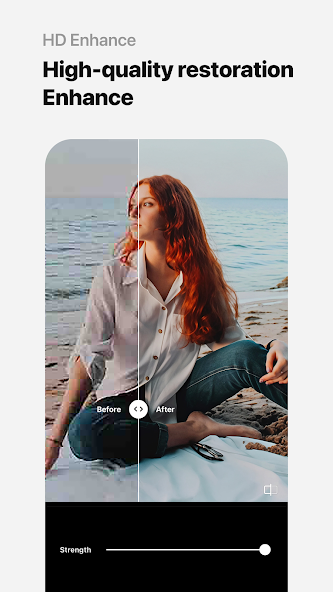
- AI Enhance: Improves image clarity and resolution to help create better-looking photos.
- AI Skin: Helps correct blemishes and improve the appearance of skin.
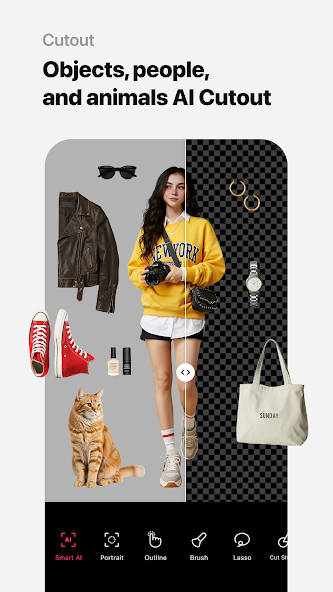
- Smart AI Cutout: Separates people, objects, and even animals from their backgrounds.
- AI Remove: Helps remove unwanted elements from a picture.
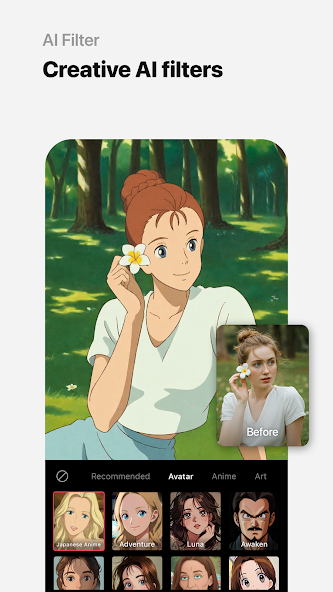
- AI Filters: Applies creative styles to transform the appearance of photos.
- Hairstyle and Expression: Provides options for experimenting with different looks.
These tools can save editing time, especially when preparing portraits or social media pictures.
Professional Photo Editing Tools
EPIK also includes manual adjustment options for users who want more control over colors, lighting, and composition.
HSL allows users to adjust individual color ranges, while Curves provides more detailed control over tonal levels. Split Tone and Selective editing offer additional ways to create a particular visual style.
Other tools include Texture, Grain, Brilliance, Vignette, Crop, Rotate, Mirror, Flip, and Perspective. Patch and Clone can help repair or copy selected areas of an image. Batch editing is also available for editing multiple photos more efficiently.
Advanced Portrait Editing
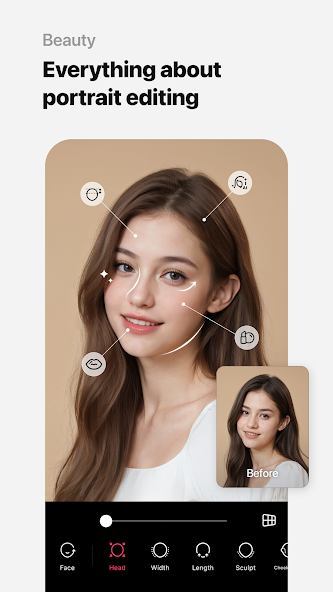
Portrait editing is one of EPIK’s main strengths. The app provides several tools for improving selfies and personal photographs.
Skin Retouching helps reduce visible blemishes and improve skin appearance. Makeup tools let users experiment with different styles, while face adjustment options provide more control over facial details.
Other portrait features include:
- Face reshaping and 3D Face adjustments
- Wrinkle and blemish correction
- Makeup styles and filters
- Body and length adjustments
- Hair color and hairstyle editing
- Individual facial adjustments
These features can help create polished portraits, but natural-looking results usually require moderate adjustments.

Trendy Filters and Creative Effects
Filters and effects provide a quick way to change the mood of a picture. EPIK includes different styles for users who want colorful, soft, dramatic, or creative results.
The Relight feature can help adjust the visual lighting effect. Users can also add stickers, text, drawings, and shapes to personalize their pictures.
Templates provide ready-made designs for different creative purposes. Instead of building a layout from the beginning, users can choose a template and customize it with their own photos.
Creative Photo Editing Features
EPIK includes several tools for creating more than standard edited pictures.
- AI Collage: Combines different photos into a creative collage.
- Spot Color: Highlights selected colors while changing the appearance of other areas.
- Mosaic: Adds mosaic and blur effects to selected parts of an image.
- Background Editing: Provides options for cutouts, backgrounds, and patterns.
- Custom Stickers: Helps users create personalized sticker designs.
- Photo Layouts: Combines pictures into different arrangements.
The app also offers video features, including video mosaic, Retro Clip, and Video Face Edit. Availability of individual tools may depend on the app version and subscription access.
What’s New in the Latest EPIK APK?
EPIK receives updates that can introduce new tools, improve existing features, and fix problems. The exact latest version should always be checked through Google Play because releases may differ by region and device.
Recent update notes have highlighted several editing improvements:
Draw Hair
The Draw Hair feature allows users to draw and fill in different hairstyles. It provides another way to experiment with hair appearance when editing portraits.
AI Background Removal
The Remove tool can use AI to identify and remove unwanted people or objects from a picture. The result may depend on the background and the quality of the original photo.
Automatic Blur and Mosaic
AI-assisted blur and mosaic effects can help identify areas that need to be hidden or blurred. This can be useful when editing pictures that contain background details or private information.
Auto Skin Enhancement
Auto Skin helps even out visible skin spots and redness. It can make portrait editing quicker than adjusting each area manually.
Neon Brush Customization
Brush customization provides more control over the color and thickness of neon-style borders. This can help users create more personalized effects.
These update details are based on published release information, but the availability of each feature should be checked in your installed version.
EPIK Mod APK Old Version Download
Some users search for EPIK Mod APK Old Version because a previous release may work better on their device or include an interface they prefer. Others may want an older version because a recent update changed a familiar editing feature.
Before installing an old APK, consider a few important points:
- Older releases may not support the latest Android versions.
- Some AI tools may stop working if they depend on updated online services.
- Previous versions may contain security problems that were fixed later.
- An old APK may not support newer editing formats or features.
- Modified older versions may be especially difficult to verify.
For the safest experience, use the current official version. If you need an older release for compatibility, check its developer, version details, and file integrity before installing it. Avoid APK files from unknown websites.
EPIK Premium Version vs Free Version
EPIK is free to download, but it also offers in-app purchases and an EPIK PRO subscription. This means that not every editing option necessarily has the same availability for free users.
| Feature | Free Version | EPIK PRO |
|---|---|---|
| Basic Editing | Available | Available |
| Photo Adjustments | Available tools | Available tools |
| Filters and Effects | Some options | Additional paid options may be available |
| Templates and Stickers | Selection available | Additional content may be available |
| Advanced Editing | Depends on the tool | More premium access |
| Subscription | Not required for basic use | Paid subscription |
The exact difference can change as EPIK updates its subscription plans and features. Check the in-app subscription screen for current pricing and included tools.
Searches for EPIK Pro App and EPIK Premium Version generally refer to the paid subscription or premium access. A MOD APK may claim to unlock these options, but such claims are not official confirmation that EPIK PRO features will work.
How to Download EPIK Editor APK
The recommended way to download EPIK is through its official Google Play listing. This helps you receive the developer’s published application and regular updates.
Follow these steps:
- Open Google Play on your Android phone.
- Search for EPIK – AI Photo & Video Editor.
- Confirm that SNOW Corporation is listed as the developer.
- Check the app information and Android compatibility.
- Tap Install and wait for the download to finish.
- Open EPIK and follow the setup instructions.
If you are searching for EPIK Photo Editor Mod APK Download, remember that third-party modified files are not officially supported. Check the source carefully and do not assume that premium features are unlocked simply because a website advertises them.

Advantages and Disadvantages of EPIK Editor
Advantages
- Offers AI-powered photo editing tools.
- Includes professional color adjustment options.
- Provides portrait retouching and makeup tools.
- Supports filters, effects, stickers, and templates.
- Includes collage and background editing options.
- Offers selected video editing features.
- Suitable for beginners and more experienced editors.
Disadvantages
- Some tools and content require a paid subscription.
- AI results may vary depending on the original image.
- Certain features may require an internet connection.
- Advanced editing options can take time to learn.
- Unofficial MOD APK files may create security and compatibility risks.
Is EPIK Editor Mod APK Safe to Use?
The safety of an EPIK Editor Mod APK depends on the file and the person or website that modified it. Unlike the official application, a third-party APK may contain changes that have not been reviewed by SNOW Corporation.
A modified file could include unwanted advertisements, harmful code, or unnecessary permission requests. It may also fail to connect to online services or stop working after an update. There is no reliable way to assume that every file advertised as EPIK Premium Unlocked is safe.
For better security, download EPIK from Google Play. If you choose to examine a third-party APK, scan it with a reputable security tool, check its permissions, and avoid providing sensitive account information. Do not upload private photographs to an unfamiliar application or service.
Best Alternatives to EPIK Photo Editor
If EPIK does not meet your editing needs, you can explore other photo editing applications.
- Adobe Lightroom: Useful for color correction, exposure adjustments, presets, and detailed photo editing.
- FaceApp: Focuses on portrait effects, facial transformations, and appearance editing.
- ToonApp: Offers cartoon-style photo effects and creative transformations.
- Snapseed: Provides manual photo adjustments and editing tools for users who want more control.
Compare the available features, privacy information, and subscription costs before choosing an alternative.
Frequently Asked Questions
What Is EPIK AI Photo Editor MOD APK?
EPIK AI Photo Editor MOD APK is an unofficial modified version of the EPIK application. Third-party websites may advertise unlocked premium tools or additional features.
What Is EPIK AI Photo Editor Pro?
EPIK PRO is the paid subscription option associated with the official EPIK app. It provides access to additional premium content or editing options, depending on the current subscription plan.
Can I Use EPIK Photo Editor Online?
EPIK is primarily a mobile photo and video editing application. Its official Android app is available through Google Play.
How Can I Download EPIK AI Photo Editor APK?
You can download the official EPIK application by opening Google Play, searching for EPIK – AI Photo & Video Editor, checking that SNOW Corporation is the developer, and tapping Install.
Is EPIK AI Photo Editor Free to Use?
EPIK is free to download and includes editing tools that users can try without purchasing a subscription. However, it also offers in-app purchases and EPIK PRO for additional premium access.
Conclusion
EPIK Editor is a feature-rich photo and video editing application that combines AI technology, professional adjustments, portrait retouching, filters, templates, and creative effects. It gives users several ways to improve pictures, experiment with different styles, and create attractive content.
EPIK Editor Mod APK is searched by users who want premium editing features without the normal subscription. However, modified versions are unofficial, and claims about unlocked tools should not be treated as guaranteed. They may also introduce security, compatibility, and stability problems.
For a reliable editing experience, download the official EPIK app from Google Play and check its current subscription options. This gives you access to the developer’s supported updates and the most dependable version of the application.
If you enjoy exploring different Android apps, you can also check out Rebel Racing Mod APK for exciting car racing gameplay, vehicle upgrades, and racing challenges.