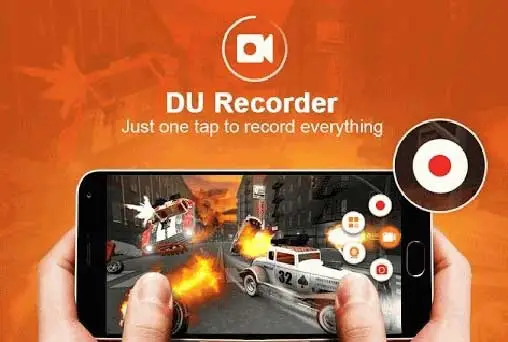
DU Recorder Mod APK remains a popular search term among Android users who want a screen recorder for gameplay, tutorials, video calls, live streams, and other on-screen activities. The original DU Recorder was known for combining screen recording with video editing and live-streaming tools, and historical Android releases supported features such as HD recording, 60 FPS capture, facecam, GIF creation, drawing tools, and livestreaming.
The Android situation is different from many current apps. The long-standing DU Recorder Android application is no longer available through Google Play, while third-party APK archives continue to preserve its version history. Current archives list DU Recorder 2.4.8.4 as the latest archived Android release, dated September 15, 2025, with Android 5.0+ support.
The iPhone and iPad version is still represented in Apple’s App Store history, where version 1.8.0 is listed from August 7, 2025. That version history also documents earlier additions such as simultaneous microphone and internal-audio recording in version 1.7.3 and 60 FPS recording in version 1.6.3.
Users searching for DU Recorder APK Download, DU Recorder Download, DU Recorder Old Version, and DU Recorder Mod APK Premium are often looking for the older Android application, premium-style features, no-watermark recording, or internal-audio support.
This guide explains what DU Recorder does, how its recording tools work, what the Mod APK and Premium keywords mean, which versions are historically relevant, and what to consider before installing an unofficial APK.
DU Recorder APK Information
| Feature | Details |
|---|---|
| App name | DU Recorder – Screen Recorder, Video Editor, Live |
| Package name | com.duapps.recorder |
| Category | Video Players & Editors |
| Latest archived Android version | 2.4.8.4 |
| Archived Android release date | September 15, 2025 |
| Android requirement | Android 5.0+ |
| Android Google Play status | No longer available |
| Main purpose | Screen recording, video editing and livestreaming |
| Recording | HD, high frame-rate options |
| Audio | Microphone and historical internal-audio support |
| Mod APK status | Premium Unlocked |
Table of Contents
What Is DU Recorder?
DU Recorder is a screen-recording application designed to capture the activity displayed on a mobile device. Historical descriptions of the Android application promoted it for recording games, video calls, live shows, tutorials, and other screen activity.
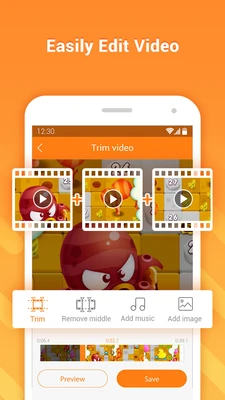
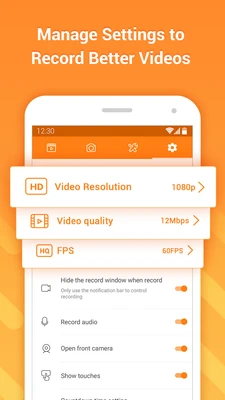
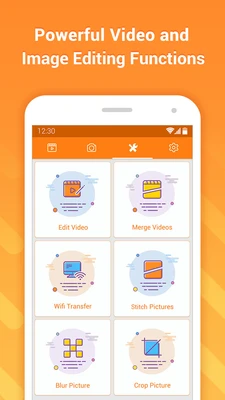
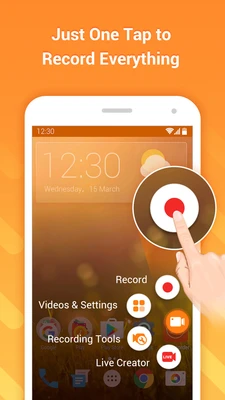
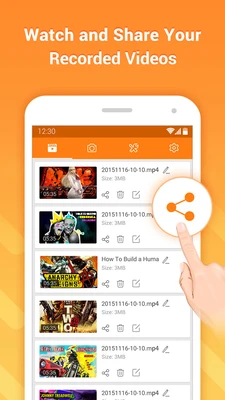
Unlike a basic recorder that only saves the screen, DU Recorder also included editing tools and livestreaming features. Historical versions supported options such as changing resolution, frame rate, bitrate, pausing and resuming recordings, adding a facecam, displaying touch operations, drawing on the screen, creating GIFs, and transferring recordings to a computer over Wi-Fi.
That combination made the app useful for mobile gamers, content creators, teachers, and anyone who needed more control over screen capture.
DU Recorder Mod APK Explained
The term DU Recorder Mod APK usually refers to an unofficial Android package that has been modified by a third party.
Searches for modified versions commonly focus on features such as:
- Premium tools
- No watermark
- Reduced advertisements
- Extended recording controls
- Additional editing options
- Modified access to paid features
These features should not automatically be treated as part of the original application. A modded APK can be based on an older release, can contain additional code, and can behave differently from the archived standard package.
The historical application itself already offered a broad feature set. For example, archived descriptions list HD recording, 1080p capture, 60 FPS support, screen drawing, facecam, GIF recording, and livestreaming.
7 Best DU Recorder Features
1. HD Screen Recording
One of the main attractions of DU Recorder was the ability to capture high-quality screen videos.
Historical Android descriptions list support for 1080p, bitrates up to 12 Mbps, and frame-rate options up to 60 FPS.
This makes the application suitable for recording:
- Mobile gameplay
- Tutorials
- App demonstrations
- Video calls
- Social-media activity
- Live content
Actual quality depends on the device, available performance, Android version, and recording settings.
2. No-Root Recording
Historical descriptions specifically promoted DU Recorder as a screen recorder that did not require root access.
This made it easier for ordinary Android users to record their screens without modifying the operating system.
Modern Android devices already provide native screen-recording functionality, but older devices benefited more from third-party tools such as DU Recorder.
3. Facecam Support
DU Recorder also included a front-camera option that could place the user’s face into the recording.
This is useful for:
- Gaming commentary
- Tutorials
- Reaction videos
- Demonstrations
- Personal video guides
A facecam can make a gameplay video more personal because viewers can see the creator while watching the recorded screen.
4. Internal Audio and Microphone Recording
DU Recorder Mod APK With Internal Audio is a particularly important search term.
The App Store version history records that version 1.7.3, released in November 2020, added support for simultaneous microphone and internal-audio recording.
This is useful when you want the recording to contain both the device’s audio and your own narration.
However, internal-audio recording on Android also depends on Android’s audio-capture restrictions and the particular device or application being recorded.
5. Video Editing
DU Recorder was not limited to recording.
Historical descriptions mention video editing capabilities and features such as trimming, merging, music, subtitles, and other post-recording adjustments.
That workflow can be convenient because you can record a clip and make basic changes without immediately opening another editing application.
6. GIF Maker
A built-in GIF recording feature was also part of the archived feature set.
Instead of saving every recording as a full video, users could capture short screen activity as a GIF.
This can be useful for short demonstrations, reactions, app tutorials, and simple animated clips.
7. Live Streaming
Historical versions also included a live-creator function capable of livestreaming the screen to platforms such as YouTube, Facebook, and Twitch.
For creators, this meant that one application could handle recording, basic editing, and broadcasting.
Live-streaming support can depend on the version and platform, so older APK features should not automatically be assumed to work on current services.
DU Recorder Mod APK Premium
DU Recorder Mod APK Premium is one of the strongest search intents around this application.
Historical APKMirror listings describe DU Recorder Premium as providing features such as ad removal, a dark theme, and additional functionality.
The official iOS version also had a subscription named DU Recorder Premium, with the App Store history describing premium items such as RTMP broadcasting, video crop, and video-speed controls.
This is an important distinction:
Official Premium: a paid offering associated with the developer’s distribution.
Mod APK Premium: an unofficial Android package that claims to unlock paid or restricted features.
They should not be treated as the same thing.
DU Recorder Mod APK No Watermark
One reason people search for DU Recorder Mod APK No Watermark is the desire for clean recordings without application branding.
Watermarks can be especially inconvenient for creators who upload gameplay or tutorials because an unnecessary logo can distract from the content.
A third-party modified APK may claim to remove a watermark, but the feature depends on the specific modification and version.
Because DU Recorder’s Android history contains many older packages, a “no watermark” claim should always be checked against the exact version rather than assumed to apply to every DU Recorder APK.
DU Recorder Mod APK Latest Version
The phrase DU Recorder Mod APK Latest Version is somewhat difficult to define because the Android application no longer has a normal current Google Play distribution.
Current third-party archives list 2.4.8.4 as the latest archived Android release, dated September 15, 2025. APKPure lists it as Android 5.0+ and 34.3 MB.
Uptodown also lists 2.4.8.4 at the top of its DU Recorder history and shows several preceding versions such as 2.4.8.3, 2.4.8.1, 2.4.8, and 2.4.7.1.
So for an Android article, 2.4.8.4 is better described as the latest archived version found in the available APK histories, not as a current official Google Play release.
For more mobile gaming content, check out our Standoff 2 MOD APK Download guide for information about FPS gameplay, Gold, weapons, skins, maps, and competitive matches.
DU Recorder Old Version APK
DU Recorder Old Version is a significant search cluster because the application has a long version history.
Current archives preserve releases such as:
- 2.4.8.4
- 2.4.8.3
- 2.4.8.1
- 2.4.8
- 2.4.7.1
- 2.4.6.9
- 2.4.6.8
- 2.4.6.7
- 2.4.6.6
- 2.4.5.1
- 2.4.4
- 2.4.2
- 2.4.0
Most of these require Android 5.0 or later.
DU Recorder 2.4.4
Version 2.4.4 is one of the frequently searched historical releases. APKMirror lists it as a January 29, 2021 build for Android 5.0+, with a 31.23 MB universal package.
DU Recorder 2.4.5.1
Uptodown records 2.4.5.1 as an October 20, 2021 release for Android 5.0+.
DU Recorder 2.4.6.6
APKMirror and APKPure list 2.4.6.6 among later historical releases, with September 2022 records in the available archives.
These historical versions can be useful when a particular older Android device no longer works properly with a newer package.
DU Recorder Mod APK 2020, 2021 and 2022
Searches for DU Recorder Mod APK 2020, DU Recorder Mod APK 2021, and DU Recorder Mod APK 2022 are mostly historical queries.
The version timeline shows releases across all these years. For example, the App Store history records internal-audio support in 2020, while APK archives show Android versions continuing through 2021 and 2022.
Users looking for older versions should understand that an old APK may behave differently from a current Android application.
Possible issues include:
- Compatibility with recent Android releases
- Missing modern features
- Outdated security components
- Playback or recording problems
- Incompatibility with newer social platforms
- Broken login or streaming functions
Old versions are therefore best used for a specific compatibility reason rather than simply because they are older.
DU Recorder Voice Changer
DU Recorder Voice Changer is another search phrase that can appear around the application.
However, the archived DU Recorder feature descriptions reviewed for this article do not establish a dedicated built-in voice changer as a standard feature of the core application.
Audio recording is well documented, including microphone capture and, in the iOS history, simultaneous microphone and internal-audio recording.
A website advertising a particular “voice changer” modification may therefore be referring to an unofficial build rather than a standard DU Recorder feature.
DU Recorder With Internal Audio
The keyword DU Recorder Mod APK With Internal Audio reflects a real historical capability.
The App Store version history states that version 1.7.3, released November 17, 2020, added simultaneous microphone and internal-audio recording.
This feature can be useful for gaming because viewers can hear the game’s sound while the creator speaks through the microphone.
Android behavior is more complicated because internal audio capture depends on the operating system and application being recorded.
If internal sound does not appear in the final recording, check the device’s audio settings and Android compatibility before assuming the recorder is broken.
DU Recorder for Gameplay Recording
DU Recorder historically suited mobile gaming because it offered high-resolution recording, 60 FPS support, facecam, touch indicators, and editing tools.
A simple gameplay workflow is:
Open DU Recorder → select recording settings → start the game → record the session → stop recording → edit the clip → save or share
For smoother gameplay recording, avoid selecting a resolution and frame rate that your phone cannot handle comfortably.
A lower bitrate or resolution can sometimes provide a better balance between video quality and game performance.
DU Recorder for YouTube and Live Content
Creators can use a screen recorder for much more than gaming.
DU Recorder’s historical livestreaming and editing features made it suitable for:
- Tutorials
- App demonstrations
- Gameplay videos
- Product walkthroughs
- Live screen broadcasting
- Short social-media clips
Archived descriptions specifically mention livestreaming to YouTube, Facebook, and Twitch.
For current streaming services, however, compatibility should be checked because older API integrations can stop working when platforms change their requirements.
Is DU Recorder Mod APK Safe?
A modified APK cannot automatically be considered safe.
The standard Android application itself is now primarily available through third-party archives, which already makes source verification important. A Mod APK introduces an additional layer of uncertainty because the code may have been altered.
Potential concerns include:
- Malware
- Modified tracking
- Unwanted advertisements
- Excessive permissions
- Account or privacy risks
- Crashes
- Compatibility problems
- Fake premium claims
This is particularly important for a screen recorder because a recorder can potentially interact with sensitive on-screen information.
Avoid using an unfamiliar modified recorder while entering passwords, payment information, authentication codes, or other private data.

Official DU Recorder vs Mod APK
| Feature | Archived Standard DU Recorder | Third-Party Mod APK |
|---|---|---|
| Package | com.duapps.recorder | May be repackaged |
| Android source | Third-party archives | Unofficial APK source |
| Latest archived Android version | 2.4.8.4 | Varies |
| Premium | Historical paid options | May claim unlocked |
| Watermark | Depends on version/settings | May claim removed |
| Internal audio | Historically supported | May claim expanded support |
| Voice changer | Not established as standard | May be advertised |
| Updates | Historical release cycle | Depends on distributor |
| Security | Depends on archive/source | Source-dependent |
| Compatibility | Older Android-focused releases | Can vary considerably |
DU Recorder MOD APK Download Guide and Installation
If you already have a legitimate APK from a source you trust, the general Android process is:
Step 1: Check the Package
Confirm that the file corresponds to the intended DU Recorder application.
Step 2: Verify the Version
Compare the APK’s version with the available version history.
Step 3: Check Compatibility
Archived DU Recorder versions generally target Android 5.0 and above.
Step 4: Open the APK
Locate the file through your Android file manager.
Step 5: Review Android’s Security Warning
Android may require permission before an APK from an external source can be installed.
Step 6: Check Permissions
Read the requested permissions before continuing.
Step 7: Install and Test
Open the recorder and make a short test recording before using it for important content.
For an unofficial Mod APK, avoid granting unrelated permissions simply to make the installation succeed.
Common DU Recorder Problems
Internal Audio Is Missing
Check whether your Android version and device support internal-audio capture. Older implementations may also behave differently from newer Android audio systems.
Recording Looks Blurry
Increase the resolution or bitrate if your phone can handle the higher recording load.
Recording Has Lag
Try reducing the resolution, frame rate, or bitrate. Heavy games can also compete with the recorder for device resources.
DU Recorder Crashes
Restart the application, free storage space, and try a different historical version if the current APK is incompatible with your device.
The APK Will Not Install
Check the Android requirement, architecture, package integrity, and whether an existing version needs to be removed first.
Live Streaming Does Not Work
Older streaming integrations may no longer function with modern platform APIs. A historical version can preserve an old feature without guaranteeing compatibility with today’s streaming services.
Frequently Asked Questions
What is DU Recorder Mod APK?
DU Recorder Mod APK generally refers to an unofficial modified Android package based on DU Recorder. Different releases can contain different modifications.
What is DU Recorder APK?
The historical Android DU Recorder package is associated with com.duapps.recorder. Current APK archives list version 2.4.8.4 as the latest archived release.
What is the latest DU Recorder Android version?
The latest archived Android version found in the available version histories is 2.4.8.4, dated September 15, 2025. It is not presented as a current Google Play release.
Does DU Recorder have a voice changer?
A dedicated built-in voice changer is not established as a standard feature in the archived application descriptions reviewed here. Third-party modifications may make separate claims.
Is DU Recorder Mod APK safe?
An unofficial APK cannot automatically be considered safe. Because a modified package can contain changed code and permissions, the source and file should be carefully evaluated before installation.
Final Thoughts
DU Recorder Mod APK remains a valuable search topic for users looking for an older Android screen recorder with recording, editing, livestreaming, and audio capabilities.
The original DU Recorder became well known for features such as 1080p recording, 60 FPS support, facecam, internal-audio options, GIF creation, screen drawing, video editing, and livestreaming.
For DU Recorder APK Download, the most important point in 2026 is that the Android application is no longer available through Google Play. Current APK archives identify 2.4.8.4, released September 15, 2025, as the latest archived Android version.
The DU Recorder Old Version search remains relevant because multiple historical builds are still indexed, including 2.4.4, 2.4.5.1, 2.4.6.6, and later releases. These older packages may be useful for compatibility, but they can also have limitations with modern Android versions and current streaming platforms.
The DU Recorder Mod APK Premium and DU Recorder Mod APK No Watermark keywords generally represent interest in unofficial modifications or premium-style functionality. Such packages should not be confused with the standard archived release or official premium offerings.
For users who need a screen recorder today, it is also worth checking whether their Android phone already provides a built-in recorder. Modern Android devices commonly include native screen-recording functionality, which can be preferable when security and compatibility are priorities.
If an APK is still chosen, verify the package name, version, source, permissions, and compatibility before installing it. This is especially important for a screen recorder because the application can potentially capture sensitive information displayed on the device.
For more Android gaming content, check out Block Tech Gameplay on GameValt to explore its vehicle-building gameplay, creative challenges, and game features.