Introduction
uTorrent is a popular Android torrent downloader that helps users download and manage files through peer-to-peer (P2P) technology. It supports torrent files, magnet links, download controls, and file selection, making it useful for managing large downloads on mobile devices. Users searching for uTorrent MOD APK Download often want to explore additional features, an ad-free experience, or options associated with the Pro edition.
The official uTorrent app offers several useful tools, including Wi-Fi-only downloading, customizable storage locations, and the ability to pause and resume transfers. However, features advertised by third-party MOD APK websites can vary, and not every modified version provides the benefits it claims. In this guide, you will learn about uTorrent’s features, the difference between its free and Pro editions, older APK versions, and important safety considerations before installing an Android app.
uTorrent MOD APK Information
| Detail | Information |
|---|---|
| App Name | µTorrent – Torrent Downloader |
| Developer | BitTorrent, Inc. |
| Version | 8.3.6 |
| Android Requirement | Android 7.0 and up |
| Category | Tools / Download Manager |
| MOD Features | Depend on the third-party build |
| Official Source | Google Play Store |
Contents: uTorrent MOD APK
What Is uTorrent for Android?
uTorrent is a torrent downloading application designed to help Android users transfer files through the BitTorrent protocol. Instead of relying on a single server for every part of a download, the protocol can transfer pieces of a file between multiple connected peers. The available speed depends on factors such as the number of peers, network conditions, and the health of the torrent.
The app supports torrent files and magnet links, allowing users to start downloads from compatible links. It also includes controls for managing downloaded content, selecting files within a torrent, and choosing where files are saved.
The official free app can handle many everyday torrent downloading tasks. Users who search for uTorrent MOD APK generally want additional benefits, such as fewer advertisements or premium features. However, a modified APK is not an official release, and its advertised changes should not be treated as verified features.
Peer-to-Peer File Sharing
Peer-to-peer technology allows connected devices to exchange pieces of a file. In a healthy torrent swarm, your device may receive different pieces from multiple peers and combine them into the complete file.
Download speed is not guaranteed. It can vary according to the number of active seeders, the availability of peers, internet speed, and any restrictions imposed by your network or device.
Torrent Files and Magnet Links
A torrent file contains information that helps a compatible client locate and download the requested content. A magnet link provides identifying information for a torrent without requiring a separate torrent file first.
uTorrent supports both methods. When you open a compatible magnet link, the app can prepare the transfer and let you manage the download from its interface.
Downloading Large Files on Android
Torrent technology can be useful for large files because it allows downloads to be transferred in pieces. The app can continue a transfer over time, provided the necessary peers remain available and the device has sufficient storage and network access.
Before starting a large download, check the available space on your phone. Also consider your mobile data allowance, because a large transfer can use substantial bandwidth.
Managing Downloads and Storage
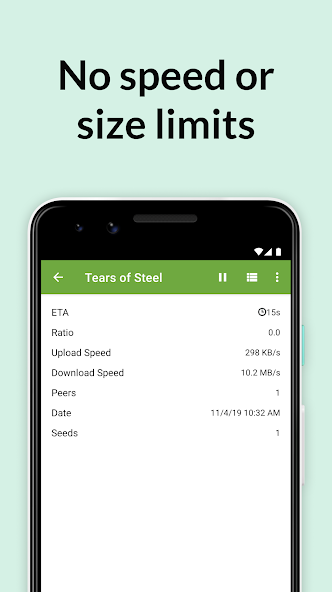
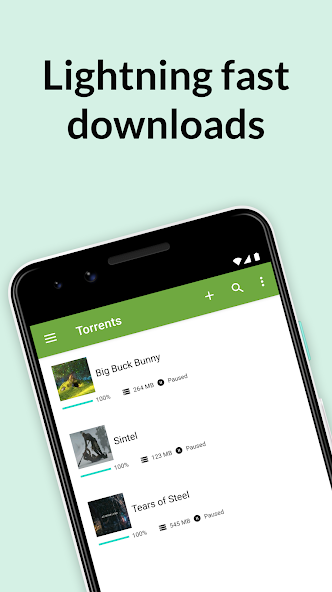
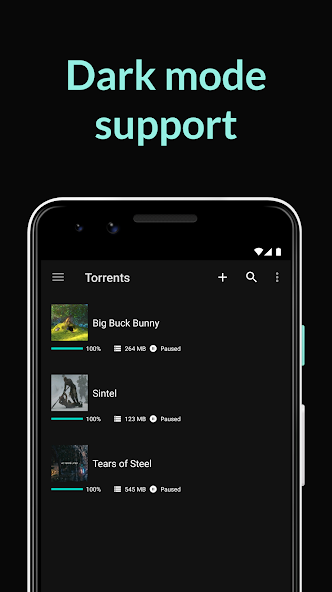
uTorrent offers controls for organizing downloads and selecting where files are stored. You can monitor active transfers, pause or resume downloads, and remove a torrent from the app.
Depending on the torrent, you may also be able to select particular files instead of downloading every item in a collection. This can help save storage space when only part of a package is needed.
uTorrent MOD APK Features
The features below describe the official app’s capabilities and common features users look for when searching for a modified version. The availability of premium or modified features depends on the specific APK. These claims should not be interpreted as confirmation that an unverified MOD build works as advertised.
1. Fast Torrent Downloading
uTorrent uses P2P technology to download file pieces from available peers. When a torrent has enough active seeders and your connection is stable, the transfer may run efficiently.
However, installing a MOD APK does not automatically increase your internet speed. Actual performance depends on the torrent swarm, network quality, device performance, and any restrictions applied by your internet provider.
2. Magnet Link Support
Magnet links provide a convenient way to open torrents without first downloading a separate torrent file. When you tap a compatible link on a website, Android may offer uTorrent as an application to open it.
This feature makes it easier to start transfers and manage them from one place. Always check the source of a magnet link before opening it, because the content it identifies may not be trustworthy or legally distributable.
3. Selective File Downloads
Some torrents contain several files in one package. Selective downloading lets you choose the items you actually need when the torrent and app support this option.
For example, a legitimate collection may contain several documents or media files, while you only need one item. Selecting individual files can reduce unnecessary downloads and help conserve storage.
4. Pause and Resume Downloads
An interrupted download does not always need to start from the beginning. uTorrent can retain transfer progress and continue downloading when the connection becomes available again, provided the required torrent data remains accessible.
This is useful when switching networks, temporarily losing connectivity, or pausing a transfer to save mobile data. The availability of peers and the condition of the downloaded pieces can affect whether a transfer resumes successfully.
5. Wi-Fi-Only Downloading
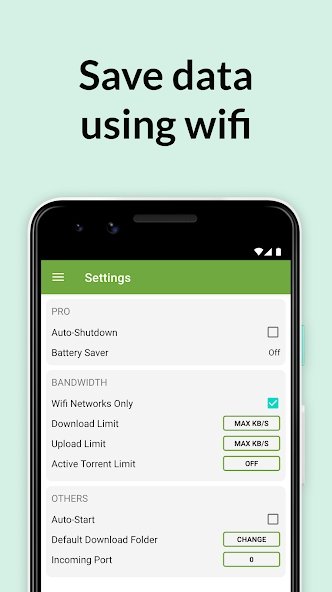
The official app includes a Wi-Fi-only mode to help users manage mobile data usage. When enabled and working as intended, it helps prevent torrent transfers from using a cellular connection.
This option is especially useful for large downloads. Check the app’s current network settings before starting a transfer, and remember that other apps may still use mobile data in the background.
6. Custom Download Locations
uTorrent allows users to choose where downloaded files are saved. Depending on your Android version and device permissions, available locations may include a designated folder in internal storage or an accessible external storage location.
Choosing a suitable folder helps keep files organized and makes it easier to locate completed downloads. Ensure that the app has the necessary storage permissions and that the destination has enough free space.
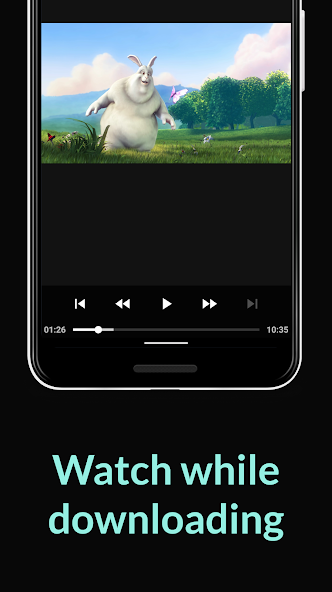
7. Built-In Music and Video Players
The supplied official app description lists integrated music and video playback. This can let users open supported media files without switching immediately to another player.
Playback compatibility depends on the file format and the device. Some formats may require a separate media player, and streaming or playing a partially downloaded file may not work for every torrent.
8. Pro Features and Advertisement Options
Some users search for uTorrent Pro APK because they want an experience with fewer advertisements or additional paid features. The exact benefits depend on the official edition and the version available in their region.
Third-party websites may advertise a MOD APK as unlocked, ad-free, or premium. Those descriptions are not proof that the file contains the claimed changes. Modified installers can also introduce unwanted code or stop working after an app update.
For more reliable updates and support, compare the official editions and their current feature descriptions before considering an unofficial build.
uTorrent APK Free Download
The official free uTorrent app provides core torrent downloading functions for Android. Users can open compatible torrent files and magnet links, manage transfers, choose a download location, and use available network controls.
For a safer installation, open the official uTorrent Google Play page. Check the developer name, current version, Android compatibility, permissions, and recent update information before installing.
The free edition may include advertisements or offer in-app purchases, depending on the current release and region. Review the listing for the latest details rather than relying on claims from an APK download website.
If your main goal is to download files without unnecessary complications, the official version is a sensible starting point. It also makes it easier to receive app updates through Google Play.
uTorrent Pro APK Download
uTorrent Pro is associated with the paid version of the application. People searching for a Pro APK may be looking for additional features, fewer advertisements, or a particular version of the app.
Before downloading any installer, confirm whether the file comes from the official publisher or an independent archive. A third-party listing does not automatically mean that the app is modified, safe, or endorsed by the developer.
The safest way to obtain the paid edition is to review the options available through the official app or its official store listing. This helps you confirm the purchase terms and receive updates through a supported channel.
uTorrent Pro APK Download Uptodown
Some users search for uTorrent Pro APK on Uptodown because they want an alternative download source or an older release. When using an independent software archive, check the exact app name, version, publication details, and available file information.
Do not assume that a listing described as Pro is an official premium release. Verify the publisher and compare the listing with the developer’s official information. Be particularly cautious if a download page promises every paid feature for free or asks you to install additional applications.
uTorrent Pro APKMirror
APKMirror is another name people include in searches for Android application packages. If you find a uTorrent listing there or on another archive, confirm the package identity, version number, signing information, and compatibility before proceeding.
An APK from an archive is not necessarily a MOD APK. Likewise, the presence of a file on a third-party website does not guarantee that it is appropriate for your device or that its contents have been changed as advertised.
Prefer official installation and update channels whenever they are available.
uTorrent Pro 8.2.55 APK
The keyword uTorrent Pro 8.2.55 APK refers to a specific version query. The app information supplied for this article identifies version 8.3.6, but it does not independently verify the availability or exact features of version 8.2.55.
If you need a particular release, compare its version number, release notes, Android requirements, and publisher information. Avoid installing an older package simply because a website labels it as premium or unlocked.
Older versions can lack later bug fixes and security improvements. They may also stop working correctly with newer Android releases.
uTorrent Old Version APK
Users may look for a uTorrent old version APK for several reasons. A previous version may have an interface they prefer, work better with a particular device, or offer compatibility with an older Android environment.
However, an older APK is not always the best solution. Previous releases may contain bugs that have since been fixed, lack important improvements, or experience compatibility problems with current Android versions.
Before installing an older version, consider the following:
- Check compatibility: Make sure the app version supports your Android release.
- Verify the source: Avoid websites that hide the developer, package details, or version information.
- Review permissions: Be cautious if an installer requests access that does not make sense for a torrent downloader.
- Protect your files: Back up important downloads before changing app versions.
- Avoid suspicious claims: An old version is not automatically ad-free, premium, or unlocked.
If you are looking for a specific version because the current app has a problem, check the official support resources first. An update or a settings change may resolve the issue without requiring an older installer.
How to Download and Install uTorrent APK on Android
The recommended approach is to install uTorrent through Google Play. If you are evaluating an APK from another source, understand that manual installation carries additional risk.
Step 1: Open the Official App Listing
Visit the uTorrent Android listing. Check the developer, app name, supported Android version, and current release information.
Step 2: Review the App Details
Read the available permissions and privacy information. Make sure the app matches the software you intend to install rather than a similarly named application.
Step 3: Download the Installer
For the official version, use the installation option provided by Google Play. If you are considering an APK from another source, assess the source’s reputation and verify the file as far as possible before opening it.
A virus scan can help identify some threats, but it cannot guarantee that a file is safe.
Step 4: Install the App
Follow the installation instructions shown by Android. For manual APK installation, Android may require permission for the specific application being used to open the installer. Grant that permission only when necessary and disable it again afterward if you do not need it.
Step 5: Configure Download Settings
After installation, review the download location, Wi-Fi-only mode, and other network options. Choose a destination with enough storage and check whether mobile data is permitted.
Step 6: Open a Trusted Torrent
Use torrent files or magnet links only from sources you trust. Download content that you own, have permission to access, or that is otherwise legally available in your location.
Advantages and Disadvantages of uTorrent
Advantages
- Supports torrent files and magnet links.
- Uses P2P technology to transfer file pieces from available peers.
- Offers download management controls, including pausing and resuming.
- Provides options for selecting files and choosing a download location.
- Includes Wi-Fi-only settings to help manage mobile data.
- Supports opening compatible media files through integrated playback features.
Disadvantages
- Download speeds depend on peers and network conditions.
- Large transfers can use considerable storage and bandwidth.
- Availability of some features may differ between free and paid editions.
- Third-party MOD APKs may be modified in unexpected ways.
- Older APK versions may miss important bug fixes and security improvements.
- Downloading copyrighted material without permission may violate applicable laws.
Official uTorrent vs uTorrent MOD APK
| Feature | Official uTorrent | Third-Party MOD APK |
|---|---|---|
| Source | Official app store or publisher | Unofficial source |
| Core torrent functions | Based on the published release | May work differently |
| Premium features | Depend on the official edition | Claims require verification |
| Advertisements | Depend on the current edition | Removal is not guaranteed |
| Updates | Supported official update channel | Updates may be delayed or unavailable |
| Security confidence | Easier to verify publisher and updates | Depends on the source and file integrity |
| Technical support | Official support resources | May not be supported by the developer |
The official version is generally the better option for users who value reliable updates, publisher verification, and predictable app behavior. A MOD APK may advertise extra benefits, but those claims should not be accepted without evidence.
Is uTorrent MOD APK Safe?
A modified APK is not automatically malicious, but its safety cannot be guaranteed simply because a website describes it as verified or premium. Modifications can change an application’s behavior, introduce unwanted code, or interfere with future updates.
Before installing any third-party APK, consider these precautions:
- Verify the publisher: Confirm the package identity and compare it with the official application.
- Review permissions: Be suspicious of requests unrelated to downloading and managing files.
- Scan the file: Use a reputable security tool, while remembering that scans cannot detect every threat.
- Avoid extra installers: Do not install unknown companion apps or configuration files just to unlock a feature.
- Protect personal information: Avoid entering sensitive account details into unfamiliar apps.
- Prefer official updates: Install supported releases through a trusted channel whenever possible.
Also remember that uTorrent is a file-transfer tool, not a guarantee that the files you download are safe. Torrents can contain misleading filenames, harmful executables, or content distributed without permission. Check the source and the contents before opening downloaded files.
Conclusion
uTorrent is an Android torrent downloader built around P2P file sharing, torrent files, and magnet links. Its official app includes practical tools for managing transfers, selecting files, controlling network usage, and choosing download locations.
Searches for uTorrent MOD APK Download, uTorrent Pro APK, and uTorrent old version APK often reflect interest in additional features or earlier releases. However, third-party descriptions do not guarantee that a modified app is genuine, secure, or capable of unlocking every advertised feature.
For the most reliable experience, begin with the official Google Play version and check its current edition and features. If you need an older release or a Pro edition, verify the publisher and version carefully before installing anything.
Frequently Asked Questions about uTorrent MOD APK
What is uTorrent MOD APK?
uTorrent MOD APK refers to an unofficially modified Android installer based on the uTorrent application. Its advertised changes can vary, and premium features or ad removal are not guaranteed.
How can I download uTorrent APK for free?
You can get the official free app from the Google Play Store. Check the publisher and current requirements before installing it.
Does uTorrent support magnet links?
Yes, the official Android app supports magnet links as well as torrent files. A compatible link can open the app and help initiate a download.
Can uTorrent pause and resume downloads?
Yes, uTorrent provides controls to pause and resume transfers. Successful resumption depends on the availability of the required torrent data and a working network connection.
If you enjoy driving simulator games on Android, you can also explore Dr Driving 2 MOD APK to learn more about its driving missions, gameplay features, and available MOD options.