Downloading videos for offline viewing can be useful when your internet connection is limited or you simply want quick access to content later. VidMate Mod APK No Ads is a popular search phrase among Android users who want a cleaner video-downloading experience without frequent advertising.
VidMate is an Android-focused video and media downloader that provides downloading, offline playback, and media-management tools. The service’s current website says it supports multiple video and audio formats and resolutions, including HD and higher-quality options, and promotes features such as background playback and offline viewing.
You may also see searches for VidMate Mod, VidMate Pro Mod APK, VidMate Mod APK Download, and VidMate Pro Mod APK Download No Ads. These searches usually come from users looking for fewer advertisements, additional features, or a more convenient way to manage downloaded media.
There is an important distinction, though. The official VidMate application and an unofficial Mod APK are not the same thing. A modified APK is created or altered by a third party, so its features, security, and compatibility can differ from the original application.

Table of Contents
What Is VidMate?
VidMate is a video and media downloader for Android. Its official website describes the app as a high-speed downloader capable of handling videos, music, images, and other media from supported websites.
The service promotes support for several resolutions and formats, including 360p, 480p, 720p, 1080p, 2K, and 4K, as well as formats such as MP4, MP3, WEBM, JPEG, and PNG.
The application also includes a built-in media player, making it possible to watch or listen to downloaded content without relying on another player.
For Android users, the main attraction is convenience. Instead of using separate tools for downloading, organizing, and playing saved media, VidMate combines those functions into one application.
What Is VidMate Mod APK?
VidMate Mod APK generally refers to an unofficial version of the VidMate Android application that has been modified by a third party.
A modified package may advertise features such as:
- Ads removed
- Premium-style options
- Extra download settings
- Additional customization
- Fewer restrictions
- Enhanced media tools
However, there is no single standard Mod APK. One website may distribute a file that is different from another file using the same name.
That means claims like “Pro unlocked” or “unlimited downloads” should be treated as descriptions of a particular third-party build, not guaranteed features of every VidMate Mod APK.
VidMate Mod APK No Ads
The main attraction behind VidMate Mod APK No Ads is straightforward: users want fewer interruptions while browsing or downloading media.
Advertisements are common in free Android applications because they provide a way for developers to monetize the service. Removing ads can make navigation feel cleaner, especially when the app contains many media or download sections.
However, an ad-free interface does not automatically mean that the application is safer, faster, or more reliable.
If a third-party APK claims to remove advertisements, the important questions are still the same:
- Who created the file?
- Is it current?
- What permissions does it request?
- Has the package been modified in other ways?
- Does it connect correctly to supported services?
Those questions matter more than the “No Ads” label itself.

VidMate Mod APK Latest Version
Users searching for VidMate Mod APK latest version usually want newer compatibility, updated downloading features, and fewer bugs.
The official VidMate website currently promotes its 2026 application and says the official app is regularly updated with new features, fixes, and performance improvements.
This is useful because download tools depend on changing websites and online services. A version that worked several months ago may behave differently after a website changes its media delivery system.
The same principle applies to modified APKs. A third-party site can label an old package as “latest” even when it no longer matches the current official release.
Before installing any APK, compare its version information with the developer’s current release.
VidMate Download Mod APK
The search phrase VidMate Download Mod APK generally indicates transactional intent. Users are not just researching VidMate; they are trying to find a modified package to install.
A safer approach is to first identify the exact application and developer, then compare the advertised APK with the official VidMate release.
Be particularly careful with download pages that contain multiple fake buttons, automatic redirects, or installers that request unrelated permissions.
A genuine video downloader should not need arbitrary access to your personal information simply because it is labeled as “Pro.”
VidMate Pro Mod APK
VidMate Pro Mod APK usually refers to a modified version that claims to unlock premium or enhanced functionality.
The idea sounds attractive, but there is a technical limitation with third-party modifications. Changing an APK doesn’t necessarily change the rules imposed by an online service or source website.
In addition, a modified application may contain extra code that has nothing to do with video downloading.
If the goal is simply to reduce advertising or improve the interface, compare the official application’s available settings and current version before assuming that a Mod APK is necessary.
VidMate Pro Mod APK Download No Ads
This long-tail query combines two expectations: Pro-style functionality and an ad-free experience.
A third-party APK may advertise both, but those claims should be verified on the exact file rather than assumed.
Also remember that different versions can be repacked under the same filename. A file described as “VidMate Pro Mod APK Download No Ads” on one website could be materially different from a package offered elsewhere.
For that reason, users should check the package carefully before installation and avoid entering sensitive information into unfamiliar modified applications.
Main Features of VidMate
HD Video Downloads
VidMate’s official website advertises downloads across several quality levels, from lower resolutions for smaller files up to 4K for supported content.
Choosing a lower quality can be useful when storage space or mobile data is limited.
Multiple Formats
The service promotes support for several video, audio, and image formats. This gives users more flexibility when saving files for different purposes.
Background Playback
VidMate also advertises background play and playlist-related functionality, which can be useful when listening to audio while using another application.
Offline Viewing
Once supported media has been downloaded, users can access it locally without relying on the original website for every playback session.
Built-In Media Player
The built-in player lets users preview or play downloaded content directly inside the application.
Status Saving
VidMate’s official site also promotes saving WhatsApp Status media before it disappears, subject to the applicable platform and content rules.
Wide Website Support
VidMate claims support for more than 1,000 websites and highlights platforms such as Facebook, TikTok, Instagram, and other content services. Actual availability can change as websites update their systems.
How VidMate Works
The general workflow is simple.
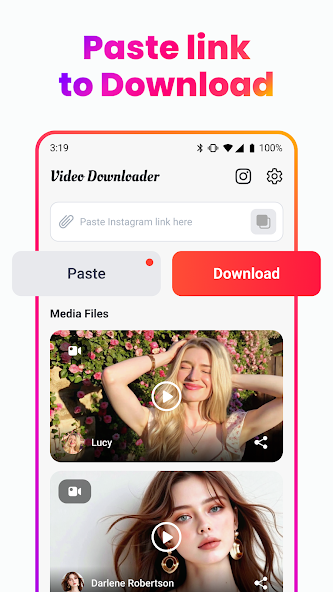
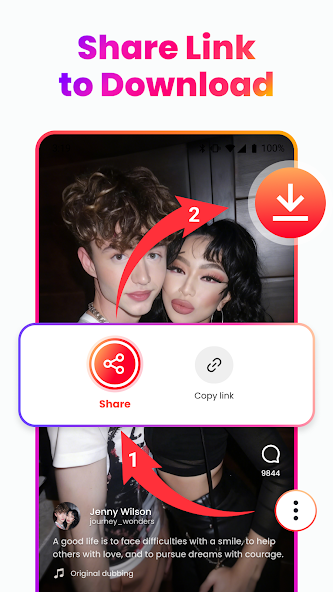
First, open the supported website or content source. Find the video you want to save and use the available download function.
VidMate then provides available quality or format choices where supported. After selecting the option you want, the file is added to the download process.
You can later access saved files from the app’s download area or your device’s storage.
The exact interface can change between versions, so buttons and menus may look different in a newer release.
Is VidMate Free?
VidMate is promoted as a free Android downloader by its official website. The site also markets free downloading and offline media features.
However, “free” does not necessarily mean that every feature across every version will remain identical. Applications can change their advertising, online services, supported websites, or other functionality over time.
This is another reason to check the current version and source before installation.
Official VidMate vs Mod APK
| Feature | Official VidMate | Unofficial Mod APK |
|---|---|---|
| Developer-controlled release | Yes | No |
| Updates | Official | Depends on distributor |
| Ads | Depends on current release | May claim removal |
| Premium features | Based on official app | May be advertised as unlocked |
| Security | Easier to verify | Source-dependent |
| Compatibility | Maintained by developer | Can vary |
| Support | Official support | Usually unavailable |
The official version provides a clearer update path and a more reliable way to identify the publisher.
Related Gaming Content
If you enjoy action-adventure games, you can also explore Lara Croft: Temple of Osiris for gameplay information and features.
For a casual and fun gaming experience, check out Wobbly Life Gameplay and see what the game has to offer.
Survival game fans can also read about Last Isle: Survival and its gameplay mechanics.
Is VidMate Mod APK Safe?
Safety is one of the biggest issues with any modified APK.
A third-party package can be changed in ways that aren’t visible from the user interface. Potential problems include malware, spyware, hidden tracking, excessive permissions, fake login screens, or outdated components.
That doesn’t mean every Mod APK is malicious. The problem is that it is harder to establish exactly what has been changed and who is responsible for the package.
VidMate’s own website recommends downloading from its official source. That gives users a better chance of getting the intended application rather than a repackaged copy.
How to Check a VidMate APK Before Installing
If you encounter a third-party APK, take a few basic precautions:
- Verify the publisher and application name.
- Compare the release with the current official VidMate information.
- Check the APK version and file details.
- Review the permissions requested.
- Scan the package with reputable security software.
- Avoid suspicious download pages and fake installer buttons.
- Keep Android’s built-in security protections enabled.
- Don’t enter sensitive credentials into an unfamiliar APK.
You should also avoid downloading or redistributing content that you do not have permission to use.
Downloading Videos Responsibly
A video downloader is a technical tool; it doesn’t automatically give you rights to the content being downloaded.
Some websites allow downloads, while others restrict them through their terms of service. Copyright can also apply to videos, music, movies, and other media.
Use VidMate for content you own, content explicitly offered for download, or material you have permission to save. This is particularly important if you plan to repost or monetize downloaded content.
VidMate Latest Version vs Old Version
Some users still search for an older VidMate Mod APK because an old interface may feel more familiar or a particular version may behave differently on their device.
Older applications can also have disadvantages. They may lack current fixes, have compatibility issues, or stop working correctly when supported websites change their systems.
If your device supports the current official release, an updated version is generally easier to maintain than an old third-party build.
Advantages and Disadvantages
Advantages
- Supports multiple media formats
- Offers several download-quality options
- Includes offline playback
- Built-in media player
- Background playback features
- Useful download-management tools
Disadvantages
- Free applications may display advertising
- Supported websites can change over time
- Download quality depends on the source
- Unofficial Mod APKs carry additional security risks
- Older versions may become incompatible
Final Verdict
VidMate Mod APK No Ads is a strong search term because it combines the popularity of VidMate with a clear user preference: fewer advertising interruptions.
VidMate itself is a feature-rich Android downloader with support for multiple formats, video qualities, offline playback, a built-in media player, and background playback. The official website currently promotes support for resolutions up to 4K and thousands of supported websites.
At the same time, terms such as VidMate Mod, VidMate Pro Mod APK, and VidMate Mod APK Download refer to unofficial third-party packages when they involve modified software. Those files can differ substantially from the official application and may carry additional security and compatibility risks.
For users who want a dependable experience, checking the current official VidMate release is the best starting point. If you consider a third-party APK, verify its source, permissions, version, and security before installing it, and only download media you are authorized to use.
Frequently Asked Questions
What is VidMate Mod APK No Ads?
It is a search term generally used for an unofficial VidMate package that claims to remove advertisements. The actual modifications depend on the specific APK.
Is VidMate free?
VidMate is promoted as a free Android video and music downloader. Its official website describes the app as available for free without requiring a subscription for the basic service.
What is VidMate Pro Mod APK?
It usually refers to a third-party modified version that claims to unlock Pro-style or restricted features. It is not automatically an official Pro release.
Is VidMate Mod APK safe?
There is no universal guarantee. Unofficial APKs can contain modifications that affect security, privacy, or compatibility.
What is the latest VidMate version?
The current official VidMate website promotes its 2026 application, but exact version numbers can change. Check the official release information before installing.
If you’re also interested in downloading AI-generated videos, check out our guide to HeyGen Video Downloader Without Watermark for more information about watermark-free video downloads.