VEED MOD APK is searched by Android users who want access to advanced video editing and AI-powered creation features without the limitations commonly associated with free versions. VEED is known as an online video creation platform that combines traditional editing tools with AI features such as text-to-video, AI avatars, voice generation, subtitles, image-to-video, and automated editing.
The search for Veed MOD APK Premium Unlocked without watermark is especially common among creators who want to export videos without the branding associated with free exports. VEED’s official information confirms that its free version can include a watermark, while paid plans offer watermark-free exports and additional capabilities.
This guide explains what VEED offers, what users mean by a modified VEED APK, its AI video generation features, editing tools, watermark considerations, compatibility, and safety information.
Table of Contents
What Is VEED MOD APK?
VEED MOD APK refers to an unofficially modified Android application package that claims to provide features associated with paid or premium versions of VEED.
Third-party APK distributors may advertise modifications such as:
- Premium features unlocked
- Watermark-free exports
- Additional AI tools
- Extra editing features
- Expanded export options
- AI video generation
- Premium templates
- Advanced effects
However, these modifications are not controlled by VEED. The exact features can therefore vary considerably between APK files.
An unofficial APK should also not be confused with an official VEED subscription. VEED itself provides its video creation tools through its online platform and official services.


VEED MOD APK Premium Unlocked Without Watermark
One of the biggest reasons people search for Veed MOD APK Premium Unlocked without watermark is the desire to create clean videos without a visible VEED watermark.
Watermarks can be inconvenient for creators publishing videos on YouTube, TikTok, Instagram, Facebook, and other platforms. VEED’s official information states that its free version includes a watermark, while upgrading to a paid plan provides watermark-free exports.
Third-party modified APKs may claim to remove this restriction.
However, users should understand that:
- A “premium unlocked” claim comes from the APK distributor.
- The modification may stop working after an update.
- The APK may not contain exactly what its download page promises.
- Unofficial software can introduce security or privacy risks.
- Official paid features can change over time.
For reliable watermark-free exporting, the official VEED plans are the supported route.
If you are interested in mobile video editing, check out our CapCut MOD APK guide to learn more about its editing tools and Pro features. For music and audio streaming, you can also explore our Spotify MOD APK Premium guide.
VEED AI Video Generator MOD APK Premium Unlocked
The Veed AI Video Generator MOD APK Premium Unlocked keyword focuses on VEED’s artificial intelligence features.
VEED currently offers AI-powered video creation that can generate videos from text, scripts, or images. Its AI video generator can combine visuals, AI voiceovers, avatars, and subtitles into a video workflow.
Instead of manually building every scene, creators can start with an idea or script and use AI to generate the initial video.
The platform also supports different AI creation workflows, including:
- Text-to-video
- Image-to-video
- AI avatars
- AI voiceovers
- AI script generation
- AI video editing
- AI-generated clips
- Automatic subtitles
- Video translation
- Dubbing
These capabilities make VEED useful for creators who want to move from an idea to an editable video without using multiple separate applications.
VEED AI Video Generator Features
Text-to-Video
VEED can transform a written idea or script into a video. According to VEED, users can type an idea or paste a script and generate a scene-by-scene video with matching visuals.
This can be useful for:
- YouTube videos
- Short-form content
- Explainer videos
- Social media posts
- Marketing videos
- Faceless videos
The generated video can then be refined in the editor.
Image-to-Video
VEED also provides image-to-video functionality. Creators can start with an image and use AI to turn it into moving visual content.
This is useful for creators who already have:
- Product images
- Character artwork
- Photographs
- Marketing graphics
- AI-generated images
AI Avatars
AI avatars allow creators to produce presenter-style videos without recording themselves on camera.
VEED lists AI avatars among its AI creation tools and supports workflows involving digital presenters, voiceovers, and generated video content.
AI Voice Generator
Voiceovers can be generated from written scripts using AI text-to-speech tools.
This can reduce the need for manual narration when producing:
- Tutorials
- Explainer videos
- Social media videos
- Product presentations
- Educational content
AI Subtitles
Subtitles are particularly useful for short-form social media videos.
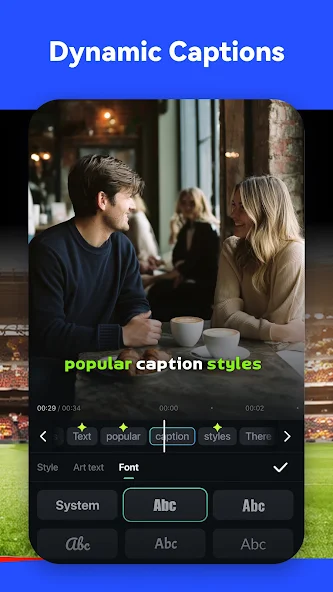
VEED provides automatic subtitle and caption tools, allowing creators to generate and customize captions instead of typing every line manually.
AI Video Editing
VEED’s AI editor can automatically assist with tasks such as removing filler words, cleaning audio, generating subtitles, and adding B-roll.
This can make editing long recordings considerably faster.
VEED Video Editing Tools
VEED isn’t limited to AI generation. It also works as a conventional online video editor.
Users can edit existing footage and add elements such as:
- Text
- Images
- Music
- Sound effects
- Captions
- Animations
- Filters
- Transitions
- Brand assets
- B-roll
The official video editor is designed around a browser-based workflow, so users can upload footage, edit it, and export the finished project without installing traditional desktop editing software.
VEED AI Clip Generator
Another useful AI feature is automatic clip creation.
VEED’s AI clip generator analyzes longer videos and identifies potentially useful sections for short-form content. Users can configure the format, length, and caption style before generating clips.
This can be useful when turning:
- Podcasts into Shorts
- Interviews into Reels
- Webinars into clips
- YouTube videos into short content
- Long recordings into social posts
VEED AI Script Generator
Creating the script is often one of the slowest parts of producing a video.
VEED provides an AI script generator that can help create scripts for formats such as YouTube videos, TikTok content, Instagram Reels, and marketing videos.
A creator can start with an idea and use the generated script as the foundation for the video.
The script can then be edited before moving into the video creation workflow.
VEED for YouTube Videos
VEED also provides AI-powered tools specifically for YouTube content.
Creators can describe a video idea and use AI to generate a video with visuals, scripts, voiceovers, and other elements. The resulting project can then be edited before export.
This can be useful for:
- YouTube Shorts
- Faceless channels
- Tutorials
- Explainer videos
- Educational content
- Product videos
- Social media campaigns
VEED for Social Media
Short-form content requires different video formats and editing styles.
VEED supports workflows for social platforms and allows creators to adjust video formats, add captions, insert graphics, and repurpose existing footage.
This makes it possible to create content for different platforms without rebuilding every project from scratch.
VEED MOD APK Latest Version
People searching for Veed MOD APK latest version should pay attention to the actual APK version rather than trusting a page title alone.
Third-party APK websites sometimes use “latest version” in titles even when the underlying file is old.
Before installing an APK, check:
| Information | What to Check |
|---|---|
| App name | VEED |
| Version | Actual version number |
| Android requirement | Minimum supported Android version |
| File size | Compare with available information |
| Developer | Verify the publisher |
| Permissions | Review requested access |
| Source | Check where the APK originated |
| Security | Scan the file |
| Update date | Check when the file was released |
A newer-looking title does not necessarily mean that the APK contains the newest VEED features.
VEED MOD APK Without Watermark
The without watermark feature is one of the strongest search intents around modified VEED APKs.
VEED’s official information says free exports can contain a watermark, while paid plans provide watermark-free exports.
A third-party APK may claim to bypass that limitation, but there is no guarantee that the modification will continue working.
For professional projects, creators should also consider whether using an unofficial modified application could create problems with account security, project privacy, or application stability.
VEED MOD APK vs Official VEED
| Feature | Official VEED | VEED MOD APK |
|---|---|---|
| Official source | Yes | Usually no |
| AI video generation | Supported | May be advertised |
| Video editing | Supported | May be modified |
| AI avatars | Supported | May be unlocked |
| AI voice tools | Supported | May be unlocked |
| Watermark-free export | Available through supported paid plans | Often advertised as unlocked |
| Updates | Official | Depends on third party |
| Security | Official distribution | Depends on APK source |
| Customer support | Official support | Usually unavailable |
| Reliability | Supported by VEED | Can vary |
The official version provides a predictable update and support process, while the functionality of a modified APK depends on the third-party distributor.

Is VEED MOD APK Safe?
There is no universal safety guarantee for unofficial APK files.
A modified APK can contain changes that are not visible from the download page. The application may include additional code, trackers, aggressive advertisements, or other unwanted components.
Before installing a third-party VEED APK, consider the following precautions.
Check Permissions
Review the permissions requested by the application. Be cautious if an editing application asks for access that appears unrelated to its purpose.
Scan the APK
Use a reputable mobile security tool to scan the APK before installing it.
Avoid Sensitive Credentials
Do not enter passwords, payment information, or other sensitive credentials into an unfamiliar modified application.
Keep Android Updated
Using the latest available Android security updates can reduce exposure to known vulnerabilities.
Keep Your Original Projects Safe
Back up important videos and project files before experimenting with third-party software.
Why VEED MOD APK May Stop Working
A modified VEED APK can stop working for several reasons.
VEED may change its online services, authentication systems, APIs, or application architecture. A modified version based on an older release may then fail to connect correctly.
Other possible causes include:
- Outdated APK
- Server-side changes
- Broken modification
- Android incompatibility
- Login problems
- Internet connection issues
- Removed AI functionality
- Expired third-party modification
Simply downloading another APK does not guarantee that the problem will disappear.
VEED AI Video Generator: Who Is It For?
VEED can be useful for several types of creators.
YouTube Creators
Creators can use AI generation, scripts, voiceovers, subtitles, and editing tools to produce videos more efficiently.
Social Media Creators
Short videos can be generated, edited, captioned, resized, and repurposed for social platforms.
Businesses
Businesses can use VEED for product demonstrations, promotional videos, advertisements, and other marketing content. VEED’s AI product video tools can generate product videos from descriptions and then allow users to refine the result in the editor.
Beginners
Because VEED combines generation and editing in one platform, beginners can start from a template, script, prompt, or existing footage rather than learning a complex professional editing application.
Common VEED Problems
Watermark on Export
Free exports can contain a watermark. VEED’s official information indicates that watermark-free exports are available with paid plans.
AI Generation Limitations
AI features can be subject to plan-based availability, credits, or other restrictions.
Video Export Problems
Export issues can result from project complexity, browser problems, account limitations, or temporary service issues.
AI Voice Problems
Voice generation can depend on the selected tool, language, plan, and current availability.
APK Crashes
An unofficial APK may crash if it is incompatible with the Android version or was incorrectly modified.
Frequently Asked Questions
Final Thoughts
Veed MOD APK latest version is a popular search for Android users interested in premium video editing and AI-powered creation features. Searches for Veed MOD APK Premium Unlocked without watermark focus particularly on removing export restrictions, while Veed AI Video Generator MOD APK Premium Unlocked targets the platform’s growing collection of AI creation tools.
VEED itself has developed into more than a basic video editor. Its current platform combines AI video generation, text-to-video, image-to-video, AI avatars, voice generation, automatic subtitles, AI editing, clip generation, and conventional video editing in one workflow.
If you are considering an unofficial APK, check the actual version, permissions, compatibility, source, and security before installation. The official VEED service remains the supported option for receiving updates, using paid features, and obtaining watermark-free exports through its official plans.
Looking for something beyond streaming? Game fans can explore Norse Saga gameplay or try the chaotic driving experience of Race Riot: Car Crash on GameValt.